objective
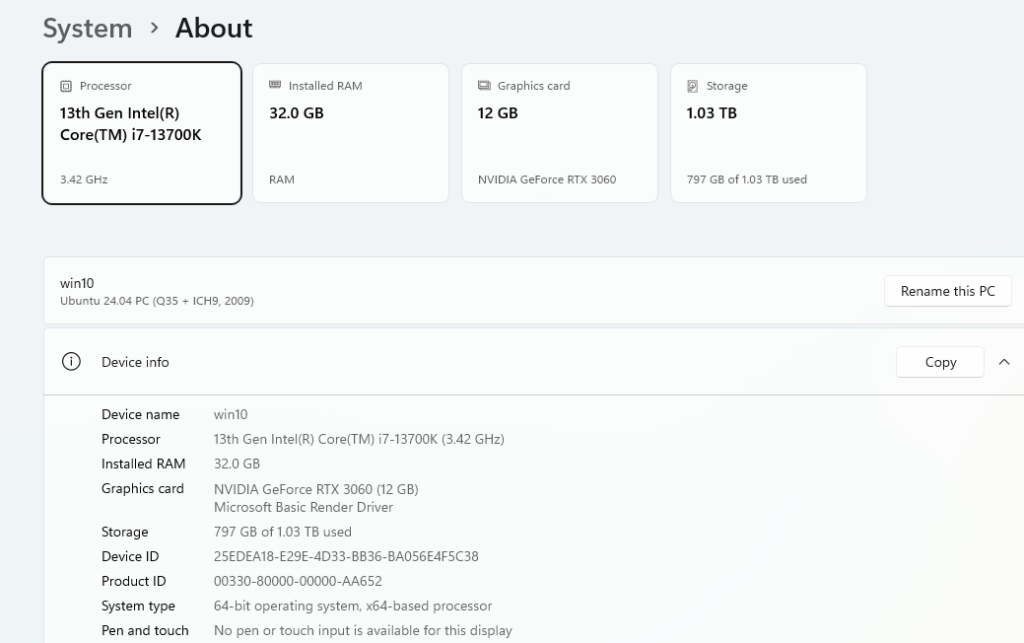
Using a Linux distribution, we will deploy a Virtual Machine that passes the dedicated Graphics card when the Virtual Machine is running.
Requirements
64-Bit Linux distribution
Linux OS must be installed in UEFI mode
QVM/KVM must be configured
Firmware virtualization must be enabled in BIOS
GPU and Motherboard has the support for UEFI
Virt Manager
Dedicated Graphics Card
Configuration
- Edit boot loader (in the case of my distribution it uses Grub)
sudo nano /etc/default/grub- GRUB_CMDLINE_LINUX_DEFAULT=”quiet splash intel_iommu=on iommu=pt”
- Update Grub
sudo update-grub
- Install and configure QEMU
- libvirtd.conf
- This conf file is the configuration file for libvirtd which is a service that handles the virtual machines
- sudo nano /etc/libvirt/libvirtd.conf
- Added the following lines to the end of this conf file
- log_filters=”3:qemu 1:libvirt”
- log_outputs=”2:file:/var/log/libvirt/libvirtd.log”
- Edit QEMU config file
- sudo nano /etc/libvirt/qemu.conf
- this controls how virtual machines are executed which includes permissions
- in this file we had to find the user and group lines, uncomment them by removing the # on both lines and then edit the user and group accordingly.
- user = xxxxxxxxxxxx
- group = xxxxxxxxxxxxxxxx
- libvirtd.conf
- Add user to libvirt group
- sudo usermod -aG libvirt xxxxxxx
- The below two commands allow me to enable and start libvirtd
- sudo systemctl enable libvirtd
sudo systemctl start libvirtd
- Restart libvirtd to allow the changes
sudo systemctl restart libvirtd
- Enable Internet Access in VM
- sudo virsh net-autostart default
- Create Virtual Machine using Virt Manager
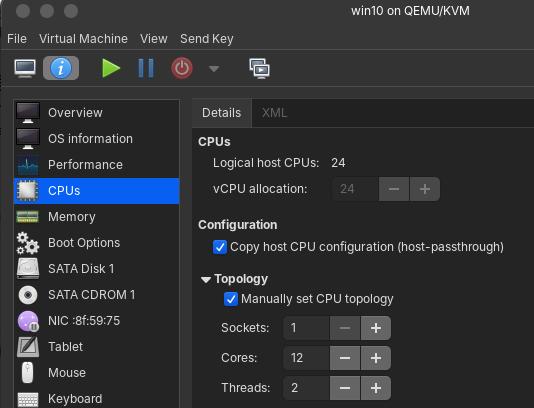
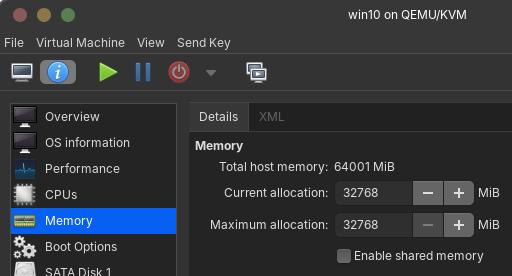
- Allocate appropriate amount of ram and CPU cores based on the ram and cpu cores of the host machine
- Change Chipset to QC35
- Change Firmware to UEFI
- CPU Changes
- Enable Copy Host CPU configuration option
- Check if the appropriate amount of cores is put in and adjust if required
- Proceed with Installation of Windows
- Implementing GPU-Passthough script
- Below is the actual script
#!/bin/bash

if test -e /etc/libvirt/ && ! test -e /etc/libvirt/hooks;
then
   mkdir -p /etc/libvirt/hooks;
fi
if test -e /etc/libvirt/hooks/qemu;
then
    mv /etc/libvirt/hooks/qemu /etc/libvirt/hooks/qemu_last_backup
fi
if test -e /usr/local/bin/vfio-startup;
then
    mv /usr/local/bin/vfio-startup /usr/local/bin/vfio-startup.bkp
fi
if test -e /usr/local/bin/vfio-teardown;
then
    mv /usr/local/bin/vfio-teardown /usr/local/bin/vfio-teardown.bkp
fi
if test -e /etc/systemd/system/libvirt-nosleep@.service;
then
    rm /etc/systemd/system/libvirt-nosleep@.service
fi

cp systemd-no-sleep/libvirt-nosleep@.service /etc/systemd/system/libvirt-nosleep@.service
cp hooks/vfio-startup /usr/local/bin/vfio-startup
cp hooks/vfio-teardown /usr/local/bin/vfio-teardown
cp hooks/qemu /etc/libvirt/hooks/qemu

chmod +x /usr/local/bin/vfio-startup
chmod +x /usr/local/bin/vfio-teardown
chmod +x /etc/libvirt/hooks/qemu
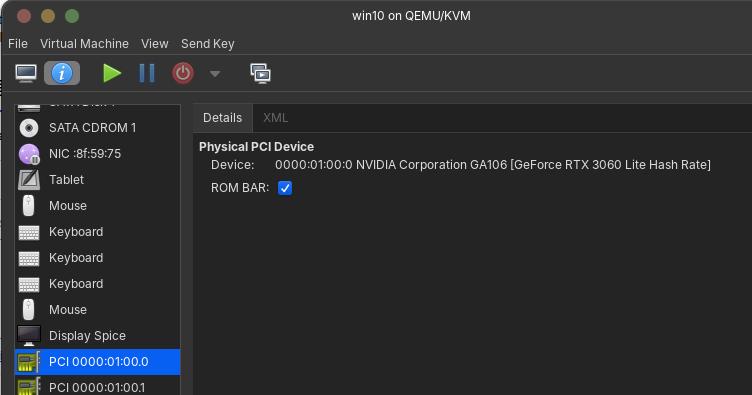
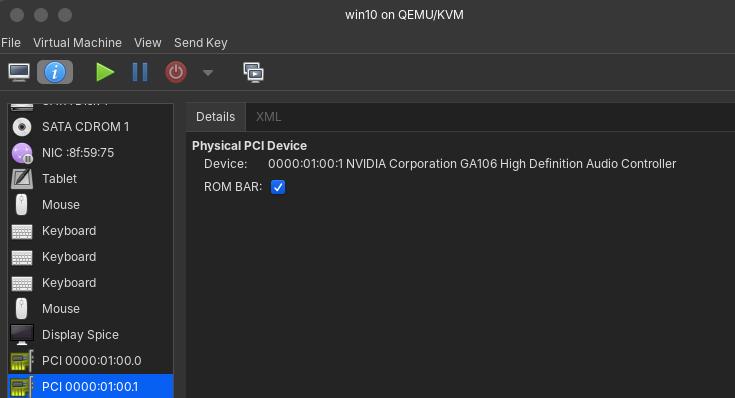
8. Add GPU to VM
9. Launch the VM
XML
Below is the complete XML for my virtual machine
<domain type="kvm">
<name>win10</name>
<uuid>b731f623-330e-4c13-a462-495f714f57c1</uuid>
<metadata>
<libosinfo:libosinfo xmlns:libosinfo="http://libosinfo.org/xmlns/libvirt/domain/1.0">
      <libosinfo:os id="http://microsoft.com/win/11"/>
    </libosinfo:libosinfo>
</metadata>
<memory unit="KiB">33554432</memory>
<currentMemory unit="KiB">33554432</currentMemory>
<vcpu placement="static">24</vcpu>
<os firmware="efi">
<type arch="x86_64" machine="pc-q35-noble">hvm</type>
<firmware>
<feature enabled="yes" name="enrolled-keys"/>
<feature enabled="yes" name="secure-boot"/>
</firmware>
<loader readonly="yes" secure="yes" type="pflash">/usr/share/OVMF/OVMF_CODE_4M.ms.fd</loader>
<nvram template="/usr/share/OVMF/OVMF_VARS_4M.ms.fd">/var/lib/libvirt/qemu/nvram/win10_VARS.fd</nvram>
<boot dev="hd"/>
</os>
<features>
<acpi/>
<apic/>
<hyperv mode="custom">
<relaxed state="on"/>
<vapic state="on"/>
<spinlocks state="on" retries="8191"/>
</hyperv>
<vmport state="off"/>
<smm state="on"/>
</features>
<cpu mode="host-passthrough" check="none" migratable="on">
<topology sockets="1" dies="1" cores="12" threads="2"/>
<feature policy="disable" name="smep"/>
</cpu>
<clock offset="localtime">
<timer name="rtc" tickpolicy="catchup"/>
<timer name="pit" tickpolicy="delay"/>
<timer name="hpet" present="no"/>
<timer name="hypervclock" present="yes"/>
</clock>
<on_poweroff>destroy</on_poweroff>
<on_reboot>restart</on_reboot>
<on_crash>destroy</on_crash>
<pm>
<suspend-to-mem enabled="no"/>
<suspend-to-disk enabled="no"/>
</pm>
<devices>
<emulator>/usr/bin/qemu-system-x86_64</emulator>
<disk type="file" device="disk">
<driver name="qemu" type="qcow2" discard="unmap"/>
<source file="/var/lib/libvirt/images/win10.qcow2"/>
<target dev="sda" bus="sata"/>
<address type="drive" controller="0" bus="0" target="0" unit="0"/>
</disk>
<disk type="file" device="cdrom">
<driver name="qemu" type="raw"/>
<target dev="sdb" bus="sata"/>
<readonly/>
<address type="drive" controller="0" bus="0" target="0" unit="1"/>
</disk>
<controller type="usb" index="0" model="qemu-xhci" ports="15">
<address type="pci" domain="0x0000" bus="0x02" slot="0x00" function="0x0"/>
</controller>
<controller type="pci" index="0" model="pcie-root"/>
<controller type="pci" index="1" model="pcie-root-port">
<model name="pcie-root-port"/>
<target chassis="1" port="0x10"/>
<address type="pci" domain="0x0000" bus="0x00" slot="0x02" function="0x0" multifunction="on"/>
</controller>
<controller type="pci" index="2" model="pcie-root-port">
<model name="pcie-root-port"/>
<target chassis="2" port="0x11"/>
<address type="pci" domain="0x0000" bus="0x00" slot="0x02" function="0x1"/>
</controller>
<controller type="pci" index="3" model="pcie-root-port">
<model name="pcie-root-port"/>
<target chassis="3" port="0x12"/>
<address type="pci" domain="0x0000" bus="0x00" slot="0x02" function="0x2"/>
</controller>
<controller type="pci" index="4" model="pcie-root-port">
<model name="pcie-root-port"/>
<target chassis="4" port="0x13"/>
<address type="pci" domain="0x0000" bus="0x00" slot="0x02" function="0x3"/>
</controller>
<controller type="pci" index="5" model="pcie-root-port">
<model name="pcie-root-port"/>
<target chassis="5" port="0x14"/>
<address type="pci" domain="0x0000" bus="0x00" slot="0x02" function="0x4"/>
</controller>
<controller type="pci" index="6" model="pcie-root-port">
<model name="pcie-root-port"/>
<target chassis="6" port="0x15"/>
<address type="pci" domain="0x0000" bus="0x00" slot="0x02" function="0x5"/>
</controller>
<controller type="pci" index="7" model="pcie-root-port">
<model name="pcie-root-port"/>
<target chassis="7" port="0x16"/>
<address type="pci" domain="0x0000" bus="0x00" slot="0x02" function="0x6"/>
</controller>
<controller type="pci" index="8" model="pcie-root-port">
<model name="pcie-root-port"/>
<target chassis="8" port="0x17"/>
<address type="pci" domain="0x0000" bus="0x00" slot="0x02" function="0x7"/>
</controller>
<controller type="pci" index="9" model="pcie-root-port">
<model name="pcie-root-port"/>
<target chassis="9" port="0x18"/>
<address type="pci" domain="0x0000" bus="0x00" slot="0x03" function="0x0" multifunction="on"/>
</controller>
<controller type="pci" index="10" model="pcie-root-port">
<model name="pcie-root-port"/>
<target chassis="10" port="0x19"/>
<address type="pci" domain="0x0000" bus="0x00" slot="0x03" function="0x1"/>
</controller>
<controller type="pci" index="11" model="pcie-root-port">
<model name="pcie-root-port"/>
<target chassis="11" port="0x1a"/>
<address type="pci" domain="0x0000" bus="0x00" slot="0x03" function="0x2"/>
</controller>
<controller type="pci" index="12" model="pcie-root-port">
<model name="pcie-root-port"/>
<target chassis="12" port="0x1b"/>
<address type="pci" domain="0x0000" bus="0x00" slot="0x03" function="0x3"/>
</controller>
<controller type="pci" index="13" model="pcie-root-port">
<model name="pcie-root-port"/>
<target chassis="13" port="0x1c"/>
<address type="pci" domain="0x0000" bus="0x00" slot="0x03" function="0x4"/>
</controller>
<controller type="pci" index="14" model="pcie-root-port">
<model name="pcie-root-port"/>
<target chassis="14" port="0x1d"/>
<address type="pci" domain="0x0000" bus="0x00" slot="0x03" function="0x5"/>
</controller>
<controller type="pci" index="15" model="pcie-root-port">
<model name="pcie-root-port"/>
<target chassis="15" port="0x1e"/>
<address type="pci" domain="0x0000" bus="0x00" slot="0x03" function="0x6"/>
</controller>
<controller type="pci" index="16" model="pcie-to-pci-bridge">
<model name="pcie-pci-bridge"/>
<address type="pci" domain="0x0000" bus="0x06" slot="0x00" function="0x0"/>
</controller>
<controller type="sata" index="0">
<address type="pci" domain="0x0000" bus="0x00" slot="0x1f" function="0x2"/>
</controller>
<interface type="network">
<mac address="52:54:00:8f:59:75"/>
<source network="default"/>
<model type="e1000e"/>
<address type="pci" domain="0x0000" bus="0x01" slot="0x00" function="0x0"/>
</interface>
<input type="tablet" bus="usb">
<address type="usb" bus="0" port="1"/>
</input>
<input type="mouse" bus="ps2"/>
<input type="keyboard" bus="ps2"/>
<input type="keyboard" bus="usb">
<address type="usb" bus="0" port="2"/>
</input>
<input type="keyboard" bus="usb">
<address type="usb" bus="0" port="3"/>
</input>
<input type="mouse" bus="usb">
<address type="usb" bus="0" port="4"/>
</input>
<tpm model="tpm-crb">
<backend type="emulator" version="2.0"/>
</tpm>
<graphics type="spice" autoport="yes">
<listen type="address"/>
<image compression="off"/>
<gl enable="no"/>
</graphics>
<audio id="1" type="none"/>
<video>
<model type="cirrus" vram="16384" heads="1" primary="yes"/>
<address type="pci" domain="0x0000" bus="0x00" slot="0x01" function="0x0"/>
</video>
<video>
<model type="qxl" ram="65536" vram="65536" vgamem="16384" heads="1"/>
<address type="pci" domain="0x0000" bus="0x10" slot="0x01" function="0x0"/>
</video>
<hostdev mode="subsystem" type="pci" managed="yes">
<source>
<address domain="0x0000" bus="0x01" slot="0x00" function="0x0"/>
</source>
<address type="pci" domain="0x0000" bus="0x03" slot="0x00" function="0x0"/>
</hostdev>
<hostdev mode="subsystem" type="pci" managed="yes">
<source>
<address domain="0x0000" bus="0x01" slot="0x00" function="0x1"/>
</source>
<address type="pci" domain="0x0000" bus="0x05" slot="0x00" function="0x0"/>
</hostdev>
<watchdog model="itco" action="reset"/>
<memballoon model="virtio">
<address type="pci" domain="0x0000" bus="0x04" slot="0x00" function="0x0"/>
</memballoon>
</devices>
</domain>
Screenshots
Leave a Reply